

How to break down a script for production
Turn a screenplay into a scene-by-scene production inventory for cast, locations, departments, special requirements, scheduling, and first-pass finance planning.
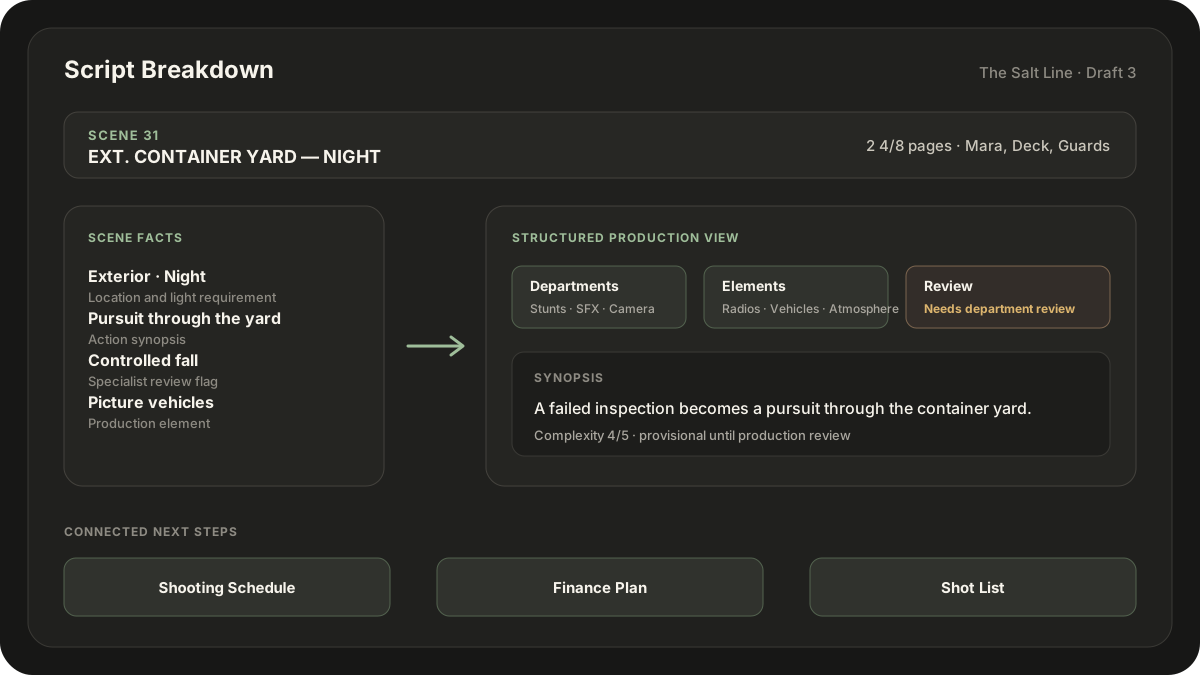
A script breakdown converts each screenplay scene into a production inventory. It identifies the cast, location, time, page length, departments, special elements, and open questions that a team must resolve before scheduling and budgeting.
Work from one numbered screenplay version and preserve it. When a new draft arrives, reconcile the breakdown against the revision instead of silently overwriting facts from the earlier draft.
Set up the scene facts first
Create one row per scene and record the material that can be read directly from the page:
- Scene number and slugline.
- Interior, exterior, or both.
- Story time such as day, night, dawn, or continuous.
- Page length, commonly measured in eighths.
- Speaking and non-speaking characters present.
- A short action synopsis.
Do not mix the written location with the planned shoot location. "INT. MARA'S OFFICE" is a script fact. "Stage 3, standing harbor set" is a production decision that belongs in a separate field.
Tag elements by department
Read action, dialogue, parentheticals, and scene headings for elements the production may need. Typical categories include:
- Cast, background, and stand-ins.
- Wardrobe, hair, makeup, prosthetics, and intimacy.
- Props, set dressing, graphics, playback, and picture vehicles.
- Stunts, special effects, visual effects, animals, and weapons.
- Camera, grip, electric, sound, transportation, and marine or aerial work.
Use "provisional" or "needs review" when the page suggests a requirement but the department has not confirmed it. An automated or first-pass breakdown should surface questions, not invent production facts.
A fictional scene example
Consider EXT. CONTAINER YARD - NIGHT, scene 31, in a harbor thriller. Mara and Deck flee guards through stacked containers, and Deck makes a controlled fall from a low platform.
A first pass might record:
| Field | Entry |
|---|---|
| Pages | 2 4/8 |
| Cast | Mara, Deck, guards |
| Departments | Stunts, SFX, camera, lighting, transportation |
| Elements | Containers, radios, picture vehicles, atmosphere |
| Flags | Night exterior, pursuit, controlled fall |
| Review | Needs department review |
The row makes dependencies visible. It does not decide the stunt method, safety controls, camera system, crew size, or shoot duration.
Add review status and complexity last
Complexity is useful only after the factual columns are complete. A one-page scene may be harder than a four-page dialogue scene because it involves night work, minors, weather, vehicles, stunts, water, crowds, or difficult access.
Use a simple review scale:
- Confirmed: checked by the responsible person or department.
- Provisional: reasonable first-pass interpretation.
- Needs review: ambiguous, high-impact, or specialist-dependent.
Then add a one-to-five complexity cue to help prioritize conversations. It is not an estimate of hours or cost.
Turn the breakdown into downstream plans
The breakdown is the common factual layer for:
- Grouping scenes into a shooting schedule.
- Estimating cast, location, equipment, and department days.
- Building an initial Finance Plan and testing cost drivers.
- Planning camera coverage scene by scene in a Shot List.
- Sharing filtered department views.
When one fact changes, update the connected documents. A location rewrite can affect the schedule, camera plan, transportation, sound, weather exposure, and cost scenario at once.
Review for safety and uncertainty
Never treat an extracted element as a complete safety assessment. Flag the scene for the qualified people who own the decision. The Contract Services safety bulletins provide production safety guidance across many common topics, but the applicable production, location, union, and jurisdiction requirements still govern.
A useful script breakdown is traceable, filterable, explicit about uncertainty, and easy to refresh when the screenplay changes. Its value is not the number of colored tags. It is the shared view of what the pages may require and what the team still needs to decide. Prescene turns that first pass into an editable table that can continue into a Shooting Schedule, Shot List, and Finance Plan.
Continue with the guides to building a shooting schedule, making a screenplay-based shot list, and separating above-the-line from below-the-line costs.
Move from screenplay to production documents
Run a Script Breakdown in Prescene, then use the editable table as the factual base for a schedule, Shot List, Finance Plan, and department review.