

How to make a shot list from a screenplay
Turn a numbered screenplay into a beat-grounded shot list with masters, coverage, inserts, camera descriptions, and production notes.
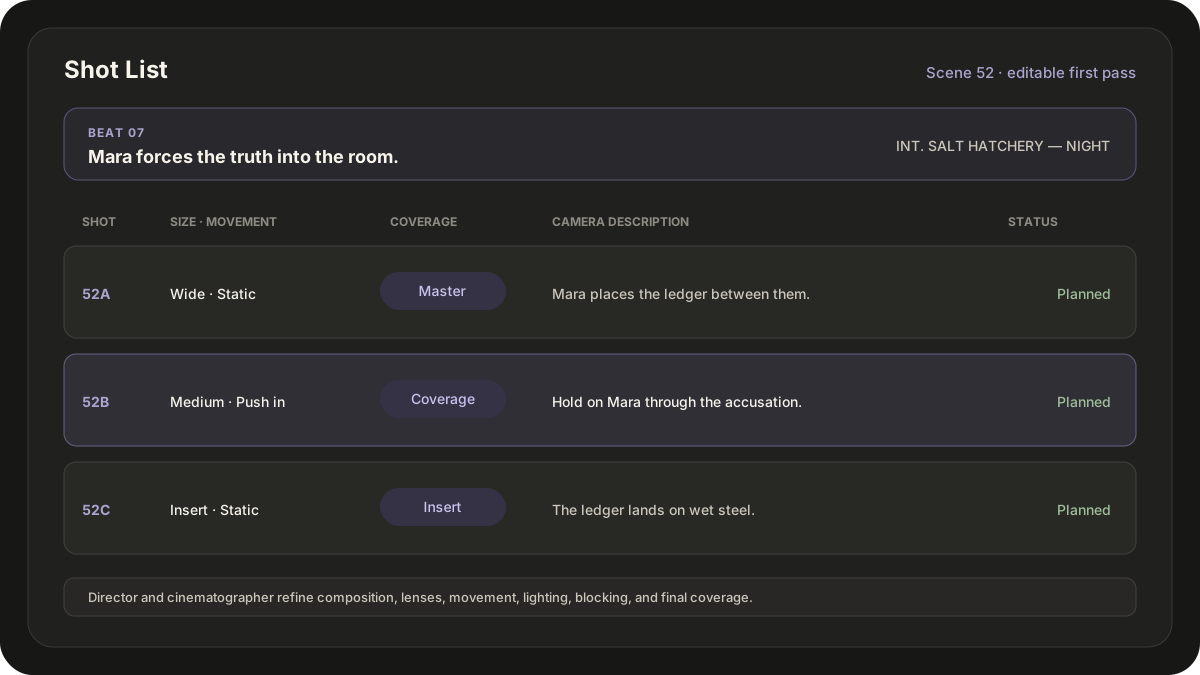
A shot list turns a screenplay scene into a camera-coverage plan. Each row should identify the scene and dramatic beat, describe what the camera sees, and give the production team enough information to discuss execution.
Start from the numbered shooting script. A shot list is a living creative document, not a replacement for the director, director of photography, blocking rehearsal, location work, safety planning, or the realities of the shooting day.
Break the scene into dramatic beats
Do not begin by listing random angles. Mark each moment when the objective, information, power, or emotion changes.
In a fictional harbor-office scene:
- Mara and Deck search for a missing record.
- Mara discovers an altered ledger.
- Deck blocks her from photographing it.
- Mara realizes he already knew.
Those beats tell you what the audience must understand. The shot choices can now support the scene instead of merely decorating it.
Establish the master
A master shows the playable action and geography for a beat or scene. It gives the editor continuity and lets the performances develop in relation to each other.
One master may cover the whole office scene. A blocking change or major turn may justify another. "Master" describes the shot's coverage function, not a mandatory wide lens or a single visual style.
Add coverage with a reason
For each beat, ask what the audience needs to see and when. Add singles, over-the-shoulders, two-shots, point-of-view shots, or inserts because they reveal information, protect performance, preserve continuity, or create an editorial option.
For the ledger discovery, a compact list might be:
| Shot | Beat | Size | Movement | Coverage | Description |
|---|---|---|---|---|---|
| 1 | Search | Wide | Static | Master | Mara and Deck search the cramped office. |
| 2 | Discovery | OTS | Push-in | Coverage | Mara opens the ledger over Deck's shoulder. |
| 3 | Discovery | Insert | Static | Insert | Altered cargo totals fill the ledger page. |
| 4 | Resistance | Medium | Static | Master | Deck blocks Mara from photographing it. |
| 5 | Realization | Close-up | Push-in | Coverage | Mara understands that Deck already knew. |
Describe the image, not the intention alone
"Suspicious shot" cannot be executed. Record the subject, framing, action, and camera behavior. Put lenses, rigs, lighting dependencies, match points, reset needs, or special equipment in production notes when they are known.
Useful columns include:
- Scene and slugline.
- Shot number and dramatic beat.
- Shot size and movement.
- Coverage function: master, coverage, insert, or B-roll.
- Visible action.
- Blocking, continuity, equipment, or department notes.
- Planning status.
Reconcile the list with production
Review the shot list at the location with the cinematographer and relevant department heads. Check sun direction, practical light, physical access, company moves, cast time, stunt or effects requirements, sound problems, art resets, and schedule pressure.
The Contract Services safety bulletins are a useful entry point for production safety topics, but the production's qualified safety personnel and applicable rules govern the plan.
Order for the edit, then order for the day
Keep scene and shot identifiers stable, even when the crew changes the execution order. The creative list should remain legible to the script supervisor and editor while the shooting order responds to lighting, blocking, resets, performance, and time.
After the scout and rehearsal, cut shots that duplicate an existing function. Add the missing insert, reaction, transition, or clean plate only when it serves the finished scene. The strongest shot list is not the longest one. It is the clearest shared plan for capturing the scene's essential choices and reconciling them with the shooting schedule. Prescene provides the editable scene-and-beat structure; the director and cinematographer remain responsible for the camera plan.
Build the list from a reconciled script breakdown, then check the camera plan against the screenplay-based scheduling guide before the production day is locked.
Start the camera plan from the screenplay
Prescene creates an editable first-pass Shot List organized by scene and beat for the director and cinematographer to refine.