

How to choose an AI script coverage tool
Choose an AI screenplay-analysis and coverage tool by testing full-script reading, source evidence, versions, score history, privacy, exports, and human review.
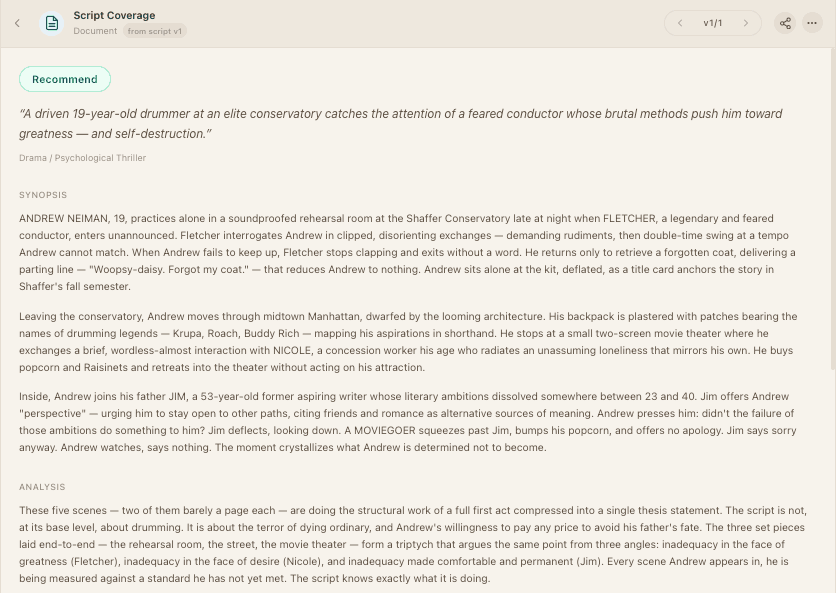
The right AI script coverage tool reads the material you intend to evaluate, shows the evidence behind its conclusions, and produces a report that fits the decision you need to make. It should also support follow-up coverage on later drafts, track what changed between them, and let you compare scores over time. Speed and feature count matter less than whether you can inspect the reasoning and return to the correct version.
Choose the job first. A writer checking a revision, a producer triaging submissions, and a development team applying a shared first-read rubric need different things. Use the framework below to test any tool against the same screenplay and the same task.
Start with the coverage job
Write one sentence that describes what the report must help you do. Useful examples include:
- decide whether a script deserves a full human read;
- identify the strongest revision priorities before another draft;
- give several readers a consistent first-pass structure;
- compare how the same story changed between versions; or
- create a synopsis, scorecard, and written assessment for a development discussion.
A tool that is useful for personal revision notes may be a poor fit for submission triage. A fast standalone report may be enough for one draft but not for a team that needs version history, reusable workflows, or durable exports.
If script coverage is new to the process, start with what a coverage report includes. If the team already has a report format, compare it with the coverage-writing framework before evaluating software.
Eight tests that matter
1. Does it read the intended screenplay?
Confirm the accepted formats, page limits, and treatment of long scripts before evaluating the output. A polished report based on an excerpt is not full-script coverage.
The tool should also distinguish a full script from a partial script. A partial draft can still receive useful feedback, but its score or verdict should not be presented with the same finality as a complete screenplay.
2. Can you trace important claims to the source?
Look for page references, scene headings, quoted details, or links back to the relevant passage. Then check several of them manually.
Source evidence does not make an interpretation correct. It makes the interpretation inspectable. A reader can disagree with the note, return to the scene, and continue the discussion from the same material.
Reject reports that rely on generic observations such as “raise the stakes” or “deepen the protagonist” without identifying where the problem appears and how it affects the story.
3. Is the report structure clear?
A useful coverage report normally identifies the source, summarizes the story through the ending, applies a stated evaluation framework, explains its findings, and recommends a next action. The exact sections should match the reader's job.
Use a stable template when comparing tools. Prescene's script coverage template and rubric includes source fields, a synopsis, ten evaluation dimensions, evidence prompts, verdict definitions, and next actions.
4. Does the rubric support judgment or hide it?
Scores are easier to discuss when the categories and scale are visible. They become misleading when a tool presents a number as a prediction of quality, commercial performance, or audience response.
Ask how categories are defined, whether written reasoning accompanies each important score, and whether the same rubric is applied across reports. A stable rubric can improve consistency. It does not remove taste, company context, or creative judgment.
5. Does it support follow-up coverage across versions?
Every report should name the exact draft or version it read. Without that label, a team can circulate notes from an old file or compare scores produced from different material.
Version handling should support a revision loop, not only file storage. Test whether the tool can run coverage on one draft, add the next version, and produce follow-up coverage under the same rubric. It should show what changed between drafts, explain what improved, regressed, or remains unresolved, and let the reader compare category and overall scores over time.
Score movement is a signal to inspect, not proof that a draft is better or worse. The written rationale and the actual changes on the page should explain why a score moved or held. A simple upload history is not the same as version-aware story context.
6. Are the data terms acceptable for the material?
Read the current privacy policy and terms before uploading an unreleased screenplay. Check:
- whether submitted material may be used for model training;
- which service providers can process it;
- how long scripts and reports are retained;
- whether deletion is available and what it covers;
- who inside a team can access the material; and
- whether the vendor offers terms appropriate for confidential company work.
The Writers Guild of America guidance on writers and AI advises writers to check with an employer before entering company material into an external model. The Federal Trade Commission also emphasizes that AI companies must honor the privacy and confidentiality promises they make to customers.
7. Does the workflow keep a person responsible?
Coverage supports a decision. It does not own one.
Look for a workflow that lets a writer or reader inspect the evidence, add company context, compare another read, and decide what happens next. High-stakes choices about development, representation, financing, or employment still require accountable human judgment. The practical roles for each approach are explored in AI vs. human script coverage.
8. Can the result move into the next step?
Check the complete workflow, not only the generated report. Useful questions include:
- Can the report be exported in a format the team uses?
- Can a reader copy evidence into a development memo?
- Can the same script run a character breakdown or another workflow?
- Can a later draft receive follow-up coverage and be compared without losing the first report?
- Does the pricing model still make sense at the team's actual volume?
Calculate cost per completed, usable report. Include setup time, failed runs, manual cleanup, exports, seats, storage, and any separate charge for longer scripts or additional workflows.
A repeatable 30-minute evaluation
Use a screenplay you own or have permission to share. Do not test a confidential third-party script unless the data terms and your agreements allow it.
- Label the file with its title, draft date, and whether it is full or partial.
- Record five anchor facts, such as the protagonist's goal, the midpoint event, a key relationship change, the climax, and the ending.
- Write three editorial questions that require judgment rather than retrieval.
- Run the same coverage job through every candidate tool.
- Verify the synopsis and anchor facts against the screenplay.
- Trace the most important positive and critical notes to their evidence.
- Score each tool from 0 to 2 on the eight tests above.
- Review the report with the person who will use it next.
Keep retrieval accuracy and editorial usefulness separate. A report can identify every event correctly and still offer weak notes. It can also make an interesting observation that collapses when checked against the page.
Warning signs
Pause before adopting a tool when:
- the report does not identify the draft or version;
- full-script reading is implied but page limits are unclear;
- scores appear without written reasoning;
- marketability is presented as a prediction;
- citations do not resolve to the screenplay;
- privacy or training terms are difficult to locate;
- every script receives similar advice;
- the output cannot be exported or shared in a useful form; or
- the product claims to replace the reader responsible for the decision.
Common questions about AI screenplay analysis
What is the best AI for screenplay analysis?
The best option depends on the job. A writer looking for exploratory notes may value conversational follow-up. A development team may need complete-script processing, one stable rubric, source evidence, exportable reports, permissions, and version history. Test candidates on the same authorized screenplay and score them against the eight criteria above instead of relying on a generic ranking.
Purpose-built coverage tools should be compared with general assistants on the complete workflow, not only the fluency of one answer. Check whether the result remains attached to the draft, whether another reader can inspect its evidence, and whether a later version can receive comparable follow-up Coverage.
Can I get free script analysis?
Some general assistants and screenplay products offer limited free use, but page limits, data terms, report depth, and retention policies vary. Verify what the tool reads and how it handles the material before uploading an unreleased screenplay.
Prescene's Screenplay Editor can be used free for writing, formatting, checkpointing, and export. Processing scripts into the Library, running screenplay analysis, and generating Coverage require an active Plus, Pro, or Max subscription and use the plan's included AI usage. There is no free Coverage trial or prepaid report pack.
Is AI script coverage reliable?
It can be useful as a structured first pass, but reliability must be tested. Verify the synopsis, check the most important claims against the screenplay, inspect whether scores match their rationale, and keep a person responsible for the decision. The AI-versus-human coverage guide explains where each approach fits.
Can an AI tool compare two screenplay drafts?
Only when it preserves the identity of both versions and evaluates meaningful story changes rather than treating the files as unrelated uploads. A useful screenplay-draft comparison should identify added, removed, moved, and rewritten scenes; explain changes in character and structure; and connect score movement to written evidence.
Where Prescene fits
Prescene Coverage is a structured first read tied to an exact version in the Library. A report includes a logline, synopsis, written assessment, scorecard, and a Full-script verdict or Partial-script current score under one consistent report structure.
When a new draft is added, Prescene can run follow-up Coverage on that version, track the changes between drafts, and compare category and overall scores across the coverage history. The comparison also identifies what improved, regressed, or remains unresolved, so score movement stays connected to the pages and written rationale. Prescene keeps the underlying script available for questions, version comparison, and other Workflows.
That structure is useful when the report needs to remain connected to the screenplay and to later work. The final development judgment still belongs to the writer, reader, producer, or team using it.
Teams evaluating cost at volume can use the Coverage workload calculator to compare preparation time, human review, and cost per completed stage without treating faster output as a better decision.
Run the rubric against a complete report
See structured Coverage with a named version, scorecard, written rationale, and evidence grounded in the screenplay.